

Hospitality Wi-Fi: Is Your Guest Network Actually Safe?

A hospitality venue is not a home network just with more chairs.
Waiheke is a premium visitor destination. Cafes, restaurants, lodges, resorts, vineyards, retreats, apartments and event venues work hard to create a high-quality guest experience. These days, reliable and secure connectivity is part of that experience.
Yet many hospitality networks have grown organically over the years: one router here, an extender there, an extra access point added later, perhaps a switch tucked into a cupboard, under a counter or beside the cleaning supplies. The Wi-Fi may appear to work, but the underlying network can be flat, poorly documented and far less secure than the venue assumes.
That matters because the same network may be carrying guest devices, staff phones, office computers, printers, smart TVs, cameras, payment terminals and point-of-sale systems.

The main risks are simple to understand
You do not need to become a network engineer to understand the problem. A poorly designed hospitality network can create several avoidable risks:
Guests may be able to reach devices or services that should only be visible to staff or business systems.
Guest devices may be able to discover or communicate with each other unless client isolation or equivalent controls are enabled.
An exposed router, weak administrator password or outdated firmware can make the network easier to attack.
Malware or compromised guest devices can create unnecessary risk for other systems sharing the same network.
A single badly behaved device can consume bandwidth or contribute to service disruption if traffic controls are not in place.
Illegal or abusive activity originating from a venue network can create complaints, investigations, disruption and reputational questions - even where the venue itself had nothing to do with the activity.
A basic home-router design can run out of address space or radio capacity surprisingly quickly when every guest brings several devices and the venue has its own growing list of connected equipment.
None of this means you should panic. Most cyber incidents are opportunistic, and sensible safeguards can make a venue a far less attractive target. The aim is not to promise that any network is impossible to breach; it is to remove obvious weaknesses, limit what a compromised device can reach and make the system easier to manage.
A separate Wi-Fi name is not necessarily a separate network
This is one of the most common misunderstandings we see.
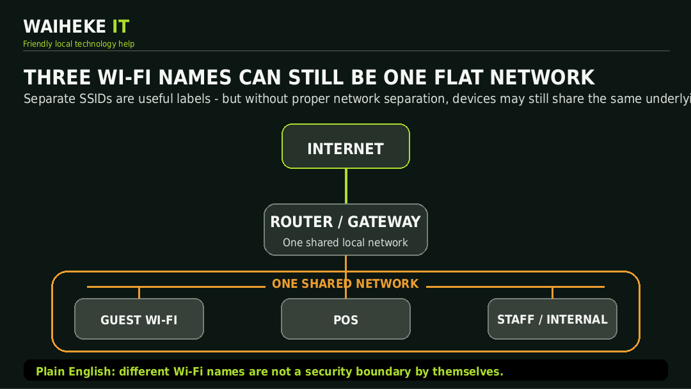
A venue may have Wi-Fi names such as Guest, POS and Staff, and naturally assume that these are three separate networks. Sometimes they are. Sometimes they are simply three different SSIDs feeding into the same underlying local network.
The Wi-Fi name is the sign on the door. Real separation happens underneath, through proper network design - typically using VLANs, firewall rules and, for guest Wi-Fi, client isolation.
Think of it like an aeroplane
Imagine an aircraft with economy, business and first class. The passengers have different boarding passes and sit in different areas, but they are still on the same aeroplane. A curtain between cabins is not the same as a locked security boundary.
A flat network can be similar. Guest, POS and Staff may look separate from the Wi-Fi menu, but underneath they may still be sharing the same network and able to see far more of each other than they should.
Proper separation is more like placing each group on its own secure deck, with locked doors and a controlled route to the Internet. The networks can share one Internet connection while remaining logically separate from one another.
How proper business safety and separation should look
With the right equipment and configuration, a single business-grade router or firewall can create several virtual local area networks, usually called VLANs.
For example, a hospitality venue might have a Guest VLAN, a POS VLAN, a Staff/Internal VLAN, a Security/CCTV VLAN and perhaps a separate network for event organisers or long-term residents.
Firewall rules then control what each VLAN is allowed to reach. Guests can go to the Internet but not to the POS system. POS devices can reach only the services they need. Staff systems can be protected from guest traffic. Guest devices can also be isolated from one another.

Security is only half the story: capacity matters too
A busy venue can hit practical limits long before anyone expects it. The headcount is not the device count.
A guest may arrive with a phone, laptop, tablet and smartwatch. Staff have phones and work devices. The venue itself may have POS terminals, printers, smart TVs, CCTV cameras, access points, switches, speakers, building systems and other equipment. All of those devices need addresses, airtime and bandwidth.
Many basic small networks use a subnet that provides roughly 250 usable device addresses. That can be perfectly adequate for a home, but it is not a sensible design assumption for a large hospitality property or event venue.
Separating groups into suitable VLANs and subnets provides more address space and better control. Proper design also considers Wi-Fi radio capacity, access-point placement, wired backhaul, Internet bandwidth, roaming and peak-event demand.

For larger venues and events, networks can be designed to support hundreds or even around 1,000 devices where the Wi-Fi hardware, Internet connection, cabling and venue environment are suitable. The important point is that capacity must be designed, not guessed.
Better networking can improve the guest experience as well as security
Doing it properly is not only about keeping systems apart. It can also give the venue much more flexibility.
Imagine hosting a conference for a professional organisation. Instead of handing everyone the general guest password, you can create a temporary, secure network just for that event - perhaps with its own Wi-Fi name, password, bandwidth policy and access period.
The same principle can be used for weddings, retreats, production crews, visiting businesses, long-stay guests, residents or contractors. The network becomes part of the hospitality offering rather than a collection of boxes that everyone hopes will keep working.
What should a hospitality network review look at?
A useful review should look beyond whether the Wi-Fi bars are full. It should consider:
How the Internet service enters the property and whether there is a single point of failure.
Whether Guest, POS, Staff, CCTV and other systems are genuinely separated.
Guest client isolation and whether guests can discover or reach each other.
Router, firewall, switch and access-point models, firmware and configuration.
Wi-Fi coverage, dead zones, interference, roaming and access-point placement.
Peak device counts, address capacity and expected event loads.
Bandwidth management so one user or device cannot spoil the experience for everyone else.
Documentation, labelling, cable condition, power protection and whether the communications area can be maintained safely.
Do not panic - just find out what you actually have
A network does not need to look terrible to be insecure, and a tidy cabinet does not automatically mean that the configuration is correct. The only way to know is to review the equipment and the way it has been configured.
If any of the above sounds relevant to your business, ask Waiheke Island Tech for a free initial network review. We can look at how your guest, POS and business systems are connected, identify obvious weaknesses and explain the options in plain English.
We are part of the Waiheke Island community, and our goal is simple: safer businesses, happier guests and technology that quietly does its job.
Free initial hospitality network review - contact Waiheke Island Tech at support@waihekeit.nz or visit waihekeit.nz.
Contact Waiheke IT | www.waihekeit.nz | support@waihekeit.nz


Comments